
For Wi-Fi router battery backup, include every powered device between your connection and the internet. That usually means the router and an optical network terminal or modem, with a switch or access point where present. Choose a supported UPS output, verify its voltage and connector requirements, and size runtime from the combined measured demand.
A small DC UPS can be convenient for an individual network setup. An AC UPS can serve the existing power adapters and other equipment. A home battery may support the circuit for longer outages, with a local UPS handling a transfer gap. Compare these options using the actual devices and the service you need to keep available.
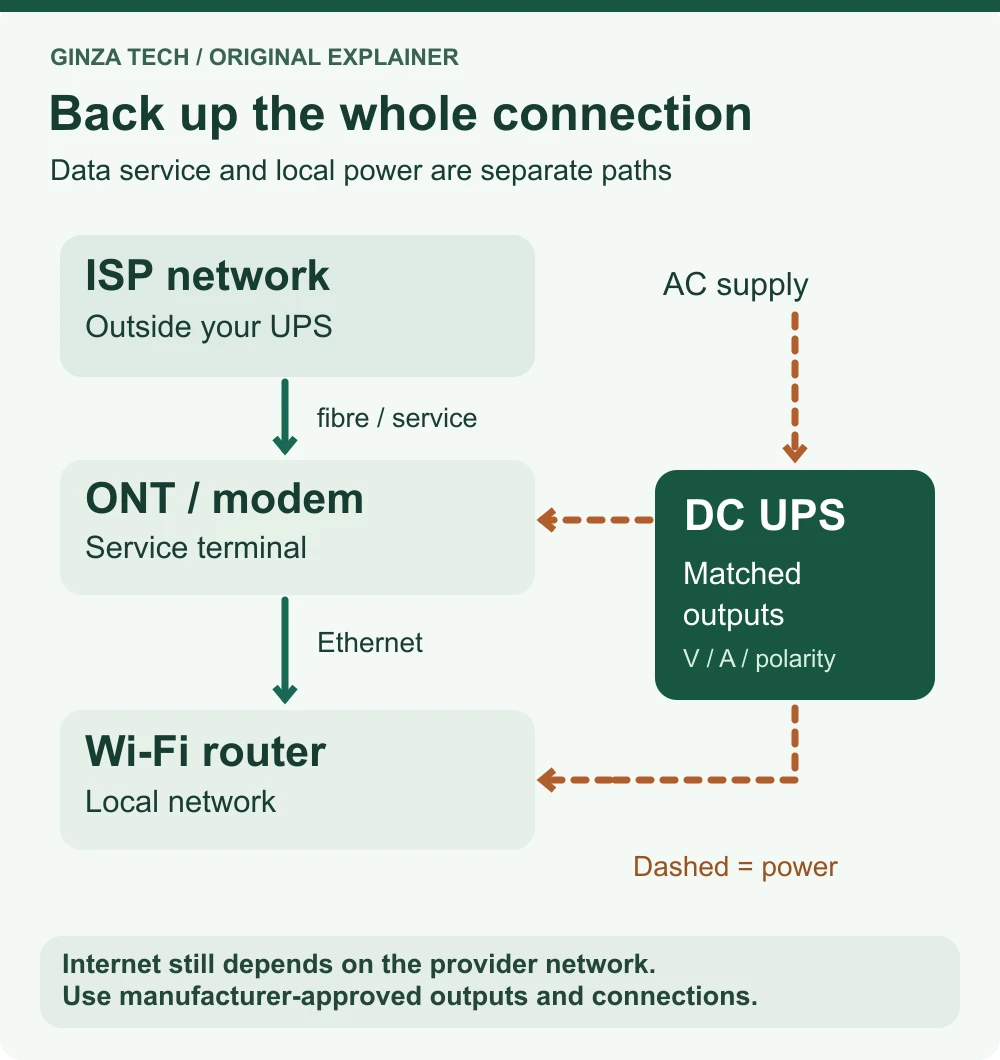
Draw the connection from the service line to the devices
Identify the box where the fibre or other service enters. Some homes use a combined gateway, while others have a separate ONT and router. Follow the network path and write down which boxes need electricity. Include a powered switch, mesh unit or phone terminal if you rely on it. Backing up only the Wi-Fi radio can leave the upstream device off.
Internet availability also depends on the provider’s equipment outside your property. Ask the provider what happens during local outages and use a real outage or an installer-controlled test to verify your needs. For work that requires continuity, retain an alternative connection plan appropriate to that job.
Check the output before comparing runtime
Read the input information on each device and the supplied adapter. For a DC UPS, confirm supported output voltage, current, connector dimensions and polarity with the device and UPS manufacturers. Check each port’s limit and the combined output limit. A connector that physically fits provides only part of that information. Use approved connection parts for the particular devices.
The Philippine manufacturer’s Panther DC UPS instructions illustrate the need to check voltage, current and polarity. Its PUD 362 specification lists different outputs and a total power limit. Use the exact product’s current documentation when comparing another unit. For an AC UPS, confirm output voltage, frequency, watt and VA limits with the adapters and attached equipment.
| Item to record | Where to find it | What to verify |
|---|---|---|
| Device and adapter model | Labels and manufacturer documents | The exact hardware revision |
| Required input | Device label | Voltage, current and supported connection |
| Backup output | UPS datasheet and manual | Per-port and combined limits |
| Runtime | Load-specific test or runtime curve | Combined devices at the intended duty |
Measure the combined load
Adapter nameplates usually describe a permitted output rather than a constant draw. A router powered through a 12 V, 1 A adapter does not necessarily consume 12 W all day. A suitable rated meter can measure the AC input of the adapters during normal use. For a DC output measurement, have the provider use an appropriate method for those devices. Keep the measurement boundary consistent with the energy figure used for runtime.
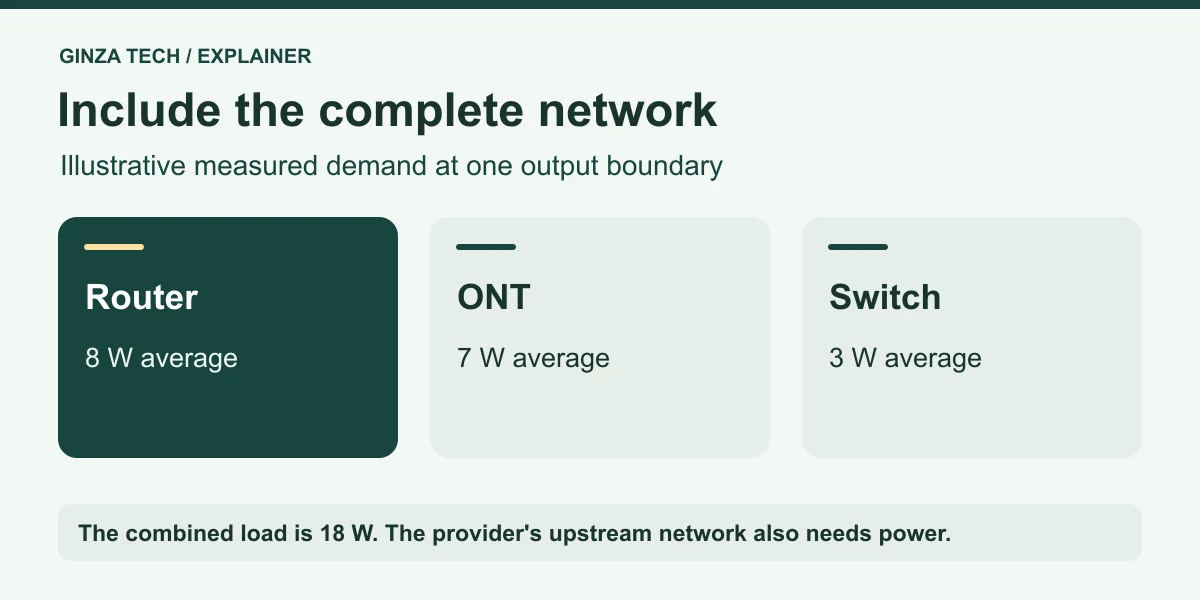
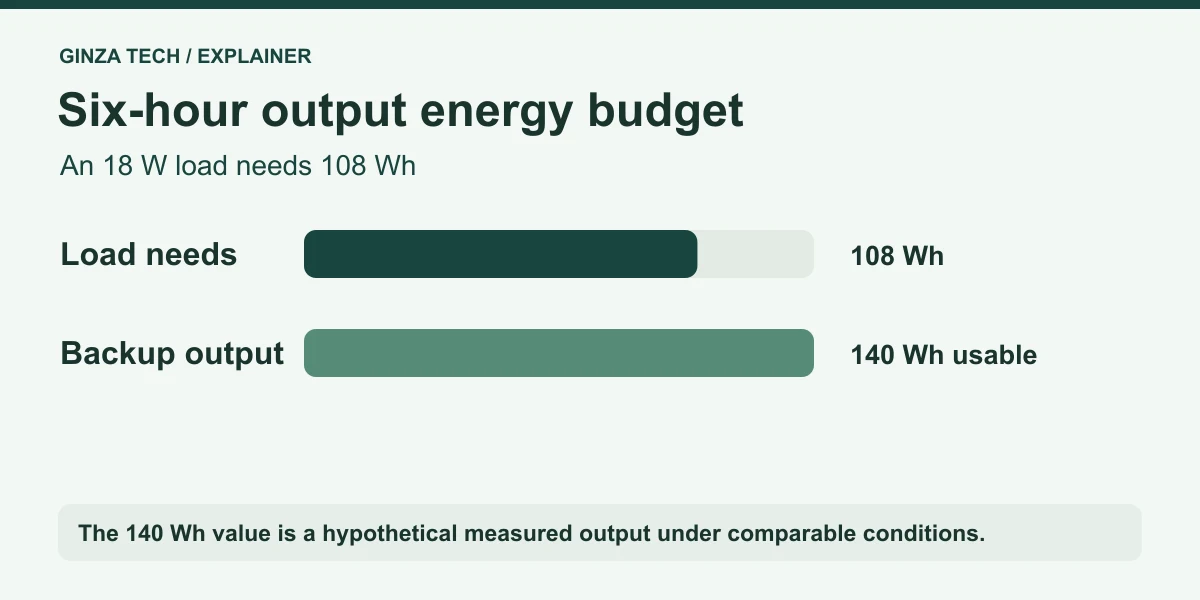
In a hypothetical setup, the router uses an average 8 W, the ONT 7 W and a small switch 3 W at the chosen output boundary. Together they need 18 W. Six hours requires 108 Wh of delivered energy. A measured usable output of 140 Wh under comparable conditions would give about 7.8 ideal hours at that load. Check how the runtime test treated the UPS’s own draw and the output cutoff.
Keep one runtime equation beside the device list
Ideal runtime in hours = usable output energy in Wh ÷ combined load in W. Both values must refer to the same output boundary. The 18 W example needs 108 Wh for six hours; a nominal cell-capacity label cannot be substituted for measured usable output without accounting for conversion and cutoff.
Record the supported output and observed load for the ONT and router separately, then total them. A continuity test passes only when the intended devices and important application stay connected through interruption and return, and recovery after depletion works as documented. Record any provider-network interruption separately from loss of local power.
Read battery capacity at the right voltage
Compare watt-hours and usable output energy. An amp-hour figure needs its reference voltage. A hypothetical pack rated at 10 Ah and 3.7 V contains 37 Wh nominal at the cell reference. Multiplying the same 10 Ah by a 12 V output would incorrectly suggest 120 Wh. The output energy depends on the pack, conversion and operating limits.
A vendor’s runtime claim is useful when it states the device load, ports used, battery condition and cutoff. Ask for an estimate with your combined devices, rather than a claim based on one lightly loaded router. The energy measurement guide explains why the boundary belongs beside the energy value.
Test the transfer and restore sequence
With the provider’s approved procedure, observe a mains interruption and return while all intended devices are operating. Check whether a call, payment or other important application stays connected. Then check what happens after the backup is depleted and recharged. Some products support cold start or automatic recovery under defined conditions, so read the exact manual and test the expected behavior.
If the network is also supplied by a larger solar backup system, ask the installer to test that sequence too. The home system may have a brief transfer interval or a delayed restart. The solar outage guide covers the circuit arrangement. Keep the total number of adapters and backup devices manageable for the person who will maintain the setup.
Leave a short handover record
Label the supported devices and ports, retain the measured combined load, and record the observed duration and test date. If the household replaces the router or adds a mesh node, repeat the power and compatibility check. Keep the installation away from heat and within the supplied environmental limits. Use the manufacturer’s replacement and service procedure for the battery.
A six-hour target should also include a recharge plan between outages. Ask how long the UPS takes to return to the tested reserve with the network still operating. If the adapter has limited spare power, simultaneous operation can change recharge time. Record that limitation before relying on back-to-back backup periods.
Recheck the result after a network upgrade
A new router, mesh node or camera recorder can alter both the load and the required outputs. Suppose the original 18 W network increases to 25 W. Six hours now needs 150 Wh at the same output boundary, and the illustrative 140 Wh supply would give about 5.6 ideal hours. The old runtime claim no longer represents the new equipment, even if every plug still fits.
Keep a port-by-port record when using a multi-output unit. A total load below the combined limit can still exceed an individual port’s rating. If the added device uses Power over Ethernet, confirm the exact supported standard and equipment combination with the supplier. A voltage label on a passive output does not establish that it supports every PoE device.
For a home office, identify what the backup is expected to protect. A router and ONT may support a laptop with its own battery, while a desktop and display add a different power and shutdown requirement. Request the runtime for the complete planned setup. This makes it easier to choose a small network UPS or a broader circuit backup without purchasing capacity for devices that were left out of the load list.
If a full-size inverter supplies a small network device, compare enabled and search mode consumption and confirm that the router stays available.
Sources and example boundaries
The 18 W load and 140 Wh usable-output figure are hypothetical. The network map is conceptual. Manufacturer output limits and runtime documentation should be checked for the selected UPS; these references do not establish that GINZA sells that mini-UPS.
Frequently asked questions
Is a high VA rating enough to give me long runtime?
VA and watts describe output capability. Runtime depends on usable energy and the actual load. The APC UPS selector separates load and runtime requirements and notes that nameplate ratings can exceed real demand.
Should I buy a home battery just for the router?
Compare a small supported UPS against the broader circuits you want to protect. The home backup comparison helps define the wider job before selecting a system.
What information helps with a wider backup quote?
Send the network device list, measured demand, target hours and the other essential circuits through the project enquiry form.